

Bit Flows is a powerful, no-code workflow automation plugin for WordPress. It runs directly on your own server with no per-task fees. You can integrate AI into WordPress for free. With Bit Flows, you can add ChatGPT to WordPress or connect other AI tools in just a few clicks. No coding needed.
The drag-and-drop visual builder makes workflow design incredibly easy. You pick a trigger like a form submission or new WooCommerce order. Then you route data to actions such as posting to WordPress, sending email, updating Google Sheets, or syncing with Mailchimp.
Bit Flows supports unlimited workflows and tasks. You can automate as much as you want without hitting any limits.
In short, Bit Flows brings “Add ChatGPT to WordPress”, “Gemini to WordPress”, “Claude to WordPress”, and “Perplexity to WordPress” into reach for everyone. The result is a self-hosted Zapier-like platform inside WordPress. You get total control while saving time and money.
Unlimited Workflows, Tasks, and Integrations
No Limits on Your Automation
Bit Flows stands out for its limitless approach to automation. Unlike many SaaS tools, there are no caps on tasks or workflows. Even the free plan gives you unlimited automation.
You can create countless multi-step flows without worrying about quotas. Every plan including free includes advanced features. You get conditional logic, loops with the Repeater tool, delayed actions, routers to split paths, iterators, and more.
Build Complex Workflows Easily
These tools let you build complex processes with ease. For example, you can split a contact form entry so one branch adds a subscriber to Mailchimp. Meanwhile, another branch logs data in Google Sheets. All this happens automatically.
All plans include the core automation tools. You get Router, Repeater (Loop), Iterator, Delay, and Conditional Logic. Instant webhooks and text/JSON parsing come built in.
True Unlimited Power
Even without a paid license, Bit Flows gives you unlimited automation power. Any WordPress event can trigger a flow. Think new user registration, new post publication, form submission, or payment completion. That flow can then perform as many actions as you design.
The plugin boasts “Unlimited workflows and automation tasks”. It can connect to hundreds of popular platforms. In practice, this means you can automate everything from marketing to e-commerce to support. You never have to fear hitting a limit.
Easy No-Code Visual Flow Builder
Drawing Your Automation
Building an automation in Bit Flows feels like drawing a flowchart. The interface is modern and intuitive. You add triggers and actions on a drag-and-drop canvas, then visually link them together.
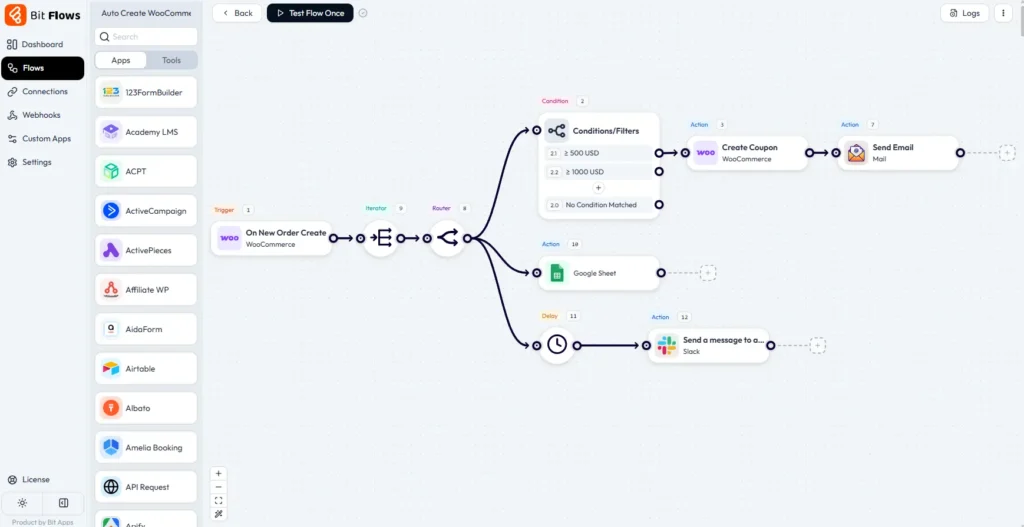
A simple click lets you pick a trigger app. Choose from WordPress, WooCommerce, Bit Form, Contact Form 7, and many others. Then select an event like “New Form Submission” or “New Order”.
Adding Actions and Special Nodes
Next, you add action nodes. These can be WordPress actions such as create a post or update a user. You can also add emails via SMTP, Google Sheets updates, Mailchimp subscriptions, and hundreds more options.
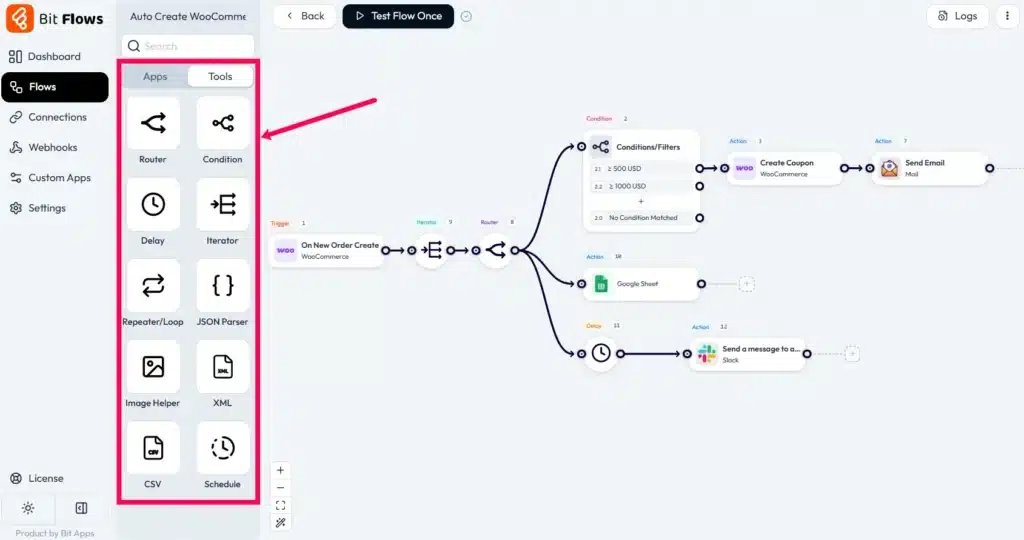
The builder includes special nodes that make automation powerful. A Router lets you branch data down different paths. A Repeater helps you loop through items. Iterators handle lists smoothly. Delay/Scheduler nodes pause execution when needed.
Real-World Example
Let me show you a practical example. Consider integrating a form with marketing tools. When a user submits a Bit Form or Contact Form 7, that trigger feeds data into a Router. One branch of the Router adds the data to Mailchimp as a new subscriber. Another branch logs the data in Google Sheets simultaneously.
Bit Flows makes these branches clear on screen. In a typical workflow diagram, a WordPress event splits into two actions. One subscribes to Mailchimp and another adds a row to Google Sheets. All without writing a line of code.
Advanced Features for Developers
Behind the scenes, Bit Flows also includes powerful tools for developers. A Custom App Builder lets you define your own API-based triggers and actions. This works for systems not natively supported.
You can import webhooks or use a generic HTTP action. If needed, you can even code in PHP. But even advanced features appear in the visual editor. Non-technical users can still set them up with guidance.
Integrations for WordPress & Beyond
238+ Built-In Apps
Bit Flows comes with 238+ platforms and counting. It covers all the essentials for WordPress sites. Popular form plugins are supported including Bit Form, Contact Form 7, WPForms, and Elementor Form.
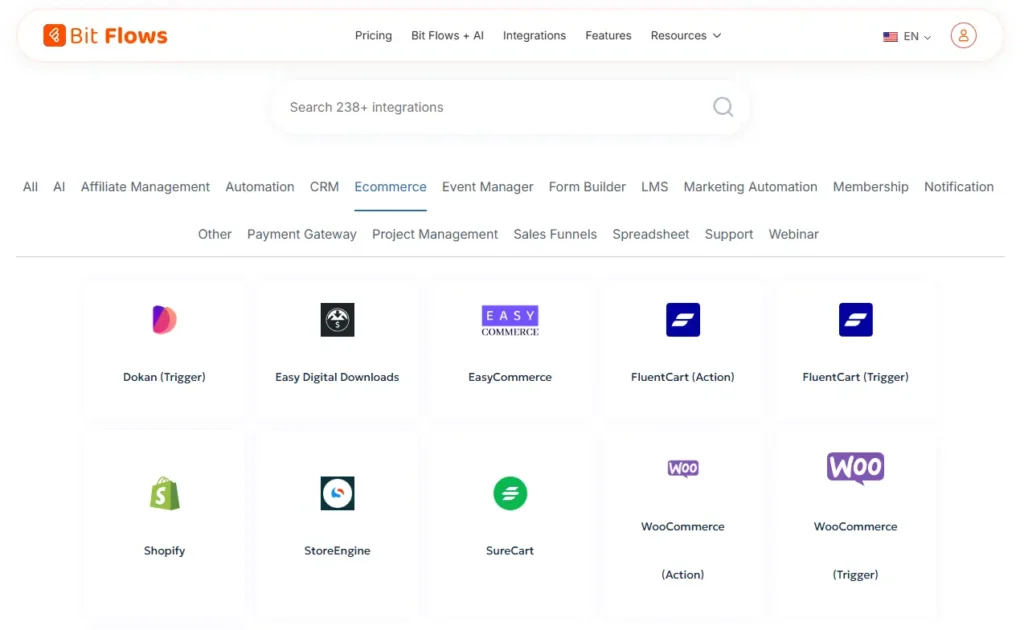
WooCommerce integration is built in. Membership and learning systems work seamlessly. Email marketing tools like Mailchimp, Brevo/Sendinblue, and FluentCRM are ready to use.
General Services Included
General services are included too. You get Google Sheets, Gmail/SMTP email, WP user events, and more.
For example, connecting WordPress user registration to Google Sheets is simple. Choose the WordPress trigger and a Google Sheets action. Then map fields visually. You could also take WooCommerce orders and feed them to an external CRM.
Connect Any Service
What if an app is not listed? Bit Flows supports both incoming and outgoing webhooks. It offers an API Request action. This means you can integrate any service with an API.
The Custom App feature lets you plug in completely new apps without coding. In short, Bit Flows connects “almost every part of your WordPress site” to external platforms.
Deep WordPress Integration
Because Bit Flows is installed on your server, it can access all your WordPress data directly. The plugin supports deep WordPress triggers like post created or user updated. It also handles actions such as create post, update user, or add comment. These work alongside third-party apps.
A single flow can mix and match them seamlessly. For instance, one flow could start from a Contact Form 7 submission. It runs the data through AI to generate a personalized reply. Then it sends an email via SMTP to the user. All these steps happen on your site, giving you full data control.
AI Integrations for ChatGPT, Gemini, Claude, Perplexity & More
All Major AI Services Built In
Bit Flows truly shines when it comes to AI. The plugin has built-in support for all major AI services. You can Integrate AI to WordPress for Free and automate content creation and processing.
You can Add ChatGPT to WordPress easily by inserting a ChatGPT (OpenAI) action into any flow. Enter your OpenAI API key and a prompt. Bit Flows handles the request and returns the AI’s response.
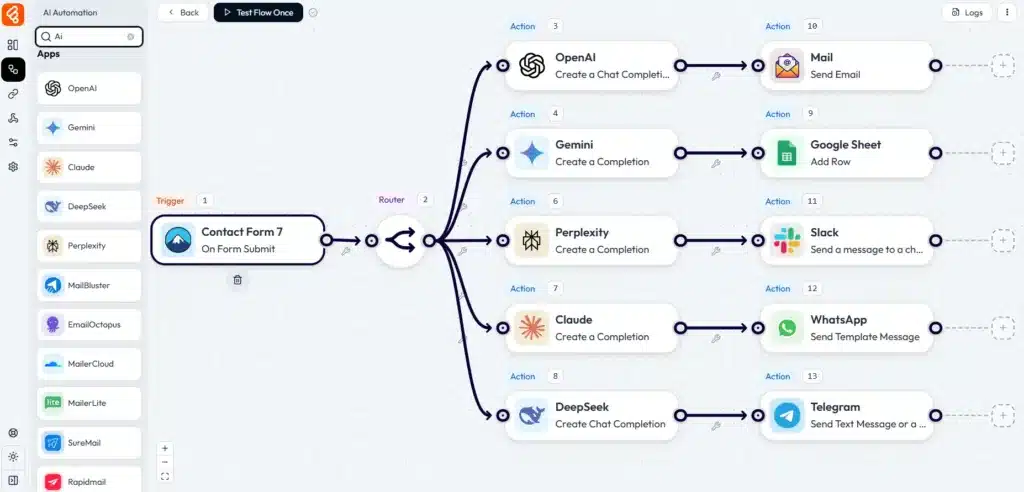
Similarly, there are native actions for Google Gemini, Anthropic Claude, DeepSeek, and Perplexity AI. This means you can use Gemini to generate SEO metadata. Or ask Claude to rewrite user questions in a polite tone.
No Extra Charges for AI
Importantly, Bit Flows does not charge extra for AI usage. It only requires an API key from the AI provider. OpenAI often gives free trial credits. Services like Google Gemini or Claude may have free tiers or trials.
As a result, you can experiment with powerful AI features without paying Bit Flows more. Workflows like “auto-generate a weekly blog post” or “create product descriptions” become trivial.
Simply schedule a flow and call GPT-4 or Gemini to write the text. Then publish to WordPress. All automatic.
Practical AI Workflow Examples
Here are a few AI-powered workflow examples you can set up immediately.
Auto-blog content works by scheduling a flow weekly. Use a ChatGPT or Gemini action to write a new post based on a topic prompt. Then add a WordPress action to publish it.
SEO metadata generation triggers when a post is saved. ChatGPT or Gemini drafts an SEO title and meta description. Map the AI output back to your post’s fields automatically.
Social summaries run after publishing. Send the post content to Gemini to generate Twitter/LinkedIn snippets. Automatically post or schedule them.
Smart customer replies connect a contact form to an AI action. For each new form entry, have ChatGPT or Claude draft an email reply. Send the reply via SMTP or your mail plugin instantly.
Real User Results
Real users report that Bit Flows saves hours of writing time by automating these tasks. With this plugin you truly bring “Gemini to WordPress”, “Claude to WordPress”, and “Perplexity to WordPress” seamlessly. You leverage AI on your own terms.
Free vs Pro and What You Get
Generous Free Version
Bit Flows follows a freemium model with a lifetime licensing option. The free version already includes an impressive range of features.
You get unlimited workflows and tasks. All the visual builder tools come included such as routers, iterators, delays, and conditional logic. Core integrations are ready to use including WordPress events, most form plugins, Google Sheets, Mailchimp, and SMTP.
AI actions are free. Custom App and Webhook modules are free. Detailed logs and email alerts for failures are free.
In fact, as one user notes, the free plan “provides basic workflows and WP triggers” and still lets you run unlimited automations. You even get free custom app/API builders.
What Pro Adds
The Pro version adds a few premium integrations and conveniences. It unlocks any proprietary triggers/actions for premium e-commerce or CRM apps if offered. Pro provides priority support. It gives access to a cloud-based cron runner for serverless scheduling if needed.
But crucially, there are no hidden paywalls on core functionality. Detailed logs of every run and email notifications for failed tasks are free for all users.
You can test and re-run flows in the dashboard at no charge. The only extra costs come from any premium apps you choose or the AI service providers themselves.
Same Features Across Plans
All Bit Flows plans including Starter, Plus, and Agency include the same full feature set. The Pro license is really about support level and licensing terms.
Many users opt for the one-time lifetime license to save money long-term. For example, Bit Flows currently offers a 1-site lifetime license for around $179.
That gives you lifetime updates and support without recurring fees. For agencies and power users, multi-site lifetime licenses are available. Options include 5 sites, 50 sites, and more at discounted rates.
Compared to paying monthly for other tools, Bit Flows’ affordability is a major selling point.
Logging, Monitoring, and Security
Comprehensive Logging System
Building automation is one thing. Ensuring it runs correctly is another. Bit Flows includes advanced logging and monitoring to keep everything transparent.
Every execution of a workflow is logged step-by-step. In the logs you can see each node’s status. Statuses include success, partial, processing, or failed. You also see start time, duration, and data passed.
If something goes wrong, the log clearly shows which action failed and why. For example, an API might return an error. This “auto-diagnostic system” helps you spot issues immediately.
A real-time Details view breaks down a run. You know exactly where to click to fix a flow.
Instant Email Alerts
You can also enable instant email alerts for failures. In one click you specify an address. Bit Flows will notify you any time a step fails.
This way you do not have to watch the dashboard constantly. A quick email alert lets you jump back into the logs. You can re-run a failed task once the issue is fixed.
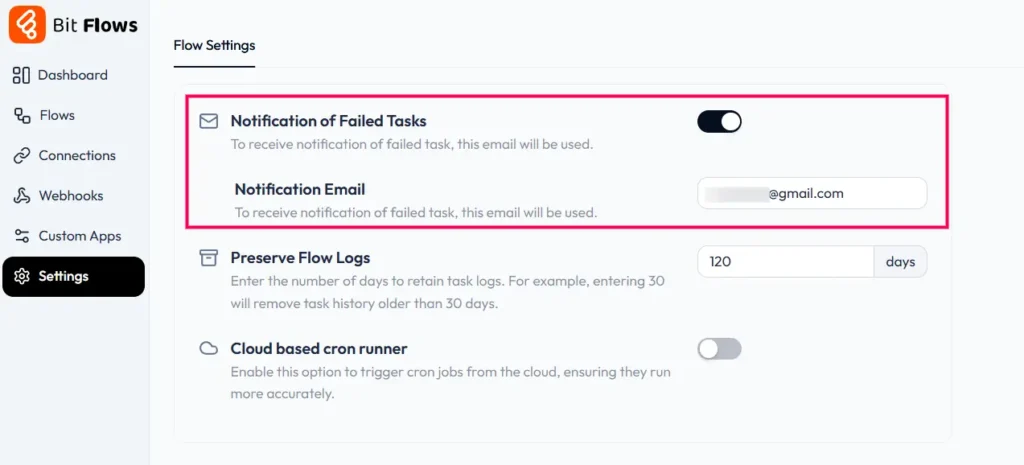
Together with the live logs, this gives you “full visibility” into your automations. These monitoring features are included for free. You never miss a broken automation.
Enterprise-Grade Security
On the security side, Bit Flows is self-hosted. Your data stays on your WordPress server. The plugin only sends data out to third-party APIs when you configure it.
All connections use TLS/HTTPS encryption. API keys are stored securely using encryption via OAuth2/JWT in the database.
The plugin itself does not collect or store any sensitive data except what you explicitly map. In short, Bit Flows gives you enterprise-grade security controls. You get self-hosting, encrypted connections, audit logs, and role-based access without any extra complexity.
Getting Started and Support
User-Friendly Resources
Even with all these features, Bit Flows stays user-friendly. A built-in Users Guide helps new users get up to speed quickly. Step-by-step blog tutorials are available. Video walkthroughs show you exactly what to do.
The official documentation covers every trigger and action in detail. Community forums are active with real examples and help. For example, the Bit Flows blog shows exactly how to integrate AI to WordPress for free with sample workflows.
You will find guides for common tasks. Examples include Contact Form 7 to Mailchimp, WordPress to CRM, AI content generation, and more. Facebook community and support email are also available for questions.
Quick Installation
To try Bit Flows, just install it from the WordPress plugin repository. The plugin is GDPR-friendly and secure. Once activated, the visual Flow Builder appears at Bit Flows then Flows in your dashboard.
From there you can create a new flow immediately. Pick triggers and actions from the list of 200+ apps. If you want to see it in action before installing, a live demo is available on the Bit Apps site.
In short, you can be automating WordPress in minutes. All without writing code or leaving WordPress.
Final Summary
Bit Flows is an incredibly comprehensive automation solution for WordPress. It offers unlimited workflows and tasks. A no-code visual builder makes creation simple. Deep WordPress and AI integrations are built in. Detailed logging keeps you informed. Strong security protects your data. All without monthly fees.
The one-time lifetime license makes it very affordable compared to competitors. If you want to turn WordPress into a smart automation engine including AI content workflows while keeping full control on your own server, Bit Flows is an excellent choice.
FAQs
What is Bit Flows?
It is a WordPress plugin that acts like an on-site Zapier or N8N. You create multi-step workflows by choosing triggers like form submissions, new users, or sales. Then you add actions such as email, CRM updates, or AI calls using a visual drag-and-drop builder.
Is Bit Flows free?
Yes. The core plugin is free and allows unlimited workflows and tasks. The free plan includes many triggers and actions. Upgrading to Pro with a yearly or lifetime license gives you priority support and any premium integrations. But you get all the main features on the free version.
Do I need to code?
No. Bit Flows is entirely no-code. You pick triggers and actions from dropdowns. Type in text for prompts or emails. Map data fields visually. It handles all the API calls behind the scenes. Even complex operations like loops and conditional branches are built with simple on-screen tools.
How many workflows can I make?
Unlimited. You can create as many flows and run them as often as you want. Even on the free plan. There are no limits on tasks per month unlike many cloud automation services.
Can I add ChatGPT to my site?
Absolutely. Bit Flows has a built-in ChatGPT (OpenAI) action. You just add it to your flow. Paste your API key and write a prompt. Your site will then send content to ChatGPT and get responses automatically without extra fees.
What about Google Gemini or Claude?
Bit Flows supports those too. You can integrate Gemini to WordPress with the “Ask Gemini” action. You can integrate Claude to WordPress with “Ask Claude”. Both are included at no cost in Bit Flows. Only the AI API cost applies.
How to control AI costs?
Because AI APIs charge per use, Bit Flows helps you manage that. You decide which model and how many tokens to use. In the flow settings you can set token limits. The logs also show token usage per run. You can keep track of your spending on OpenAI or other services. This transparency helps you stay within budget.
Which triggers/actions are free?
The free version gives you the basics. WordPress core events, like post created or user registere,d are free. Popular form plugins such as Bit Form, Contact Form 7, and WPForms are included. WooCommerce events work out of the box.
Common actions are free including create post, update user, send email via SMTP, add subscriber to Mailchimp, and add row to Google Sheets. Custom Webhooks, API Request, and Custom App actions are also free. Premium add-ons if any are only in Pro.
Does Bit Flows store API keys or data?
It only stores the API keys you enter. These are encrypted. It also stores any output you map to WordPress fields. It does not store extra data from the automations unless you explicitly save it. For example, it will not keep chat transcripts unless you save them to a post or database field.
Who should use Bit Flows?
Any WordPress site owner who has repetitive tasks to automate. It is great for bloggers who want auto-posting content. Small businesses benefit from lead capture and CRM sync. E-commerce stores can automate order workflows. Agencies manage multi-client automations easily.
Anyone interested in AI can use it for auto-generating content or replies. Non-technical users love the drag-drop interface. Developers appreciate the custom triggers and actions.
Can I connect Bit Flows to Zapier or Make?
Bit Flows itself is an alternative to those platforms. But it can send data to them if needed. There are Zapier and Make connectors in the app list for hybrid workflows. More commonly, you would use Bit Flows to avoid external automation fees entirely.
Is there a lifetime license?
Yes. Bit Flows offers one-time lifetime plans. For example, around $179 for one site. These include lifetime updates and support.
This is often cheaper long-term compared to subscriptions. They also have multi-site lifetime licenses. Options include 5-site, 50-site, and 100-site plans at higher one-time prices.
Where can I find tutorials?
The Bit Flows website has a User’s Guide and blog with step-by-step examples. YouTube also has walkthrough videos on the Bit Apps channel. Many blog posts cover common tasks. For instance, Contact Form 7 to Mailchimp integration for free using Bit Flows.